

Frequently Asked Questions
Browse by Topic
My Account
Access your account and credentials.
General Equipment
Understand your installation.
Router & WiFi
Troubleshoot common issues.
Equipment Ownership
Learn which devices belong to Noble WiFi.
Billing & Payments
Find payment and billing help.
Technical Support
Get assistance from our team.
My Account FAQs
Access your Noble WiFi account and credentials.
Your account username and password are provided with your service agreement when installation is completed. Keep these details secure. If you cannot locate them, contact Noble WiFi Support.
Sign in to the Noble WiFi customer portal using your assigned credentials, then choose the password-change option in your account settings.
General Equipment FAQs
Understand the equipment involved in your internet installation.
A LAN (Ethernet) cable connects network equipment, such as your WiFi router and the indoor power adapter associated with your outdoor wireless device.
The power adapter plugs into the electrical outlet and provides power to the CPE (device installed on the outside).
A surge protector protects your WIRELESS ROUTER and the CPE (device on the outside) from electrical surge which may cause irreparable damage.
In the event the CPE gets damaged, and the customer does not have a surge protector, the replacement of CPE will be at the cost to the customer.
Router & WiFi Troubleshooting
Helpful guidance for your router and WiFi connection.
A Wi-Fi router is a hardware device that shares your internet connection with multiple devices wirelessly.
How a Wi-Fi Router Works
- Connects to the CPE. The router links to a CPE using an Ethernet cable. The CPE brings the internet from your service provider into your home.
- Broadcasts a Signal: The router takes that internet signal and turns it into radio waves, creating a wireless Wi-Fi network.
- Directs Traffic: Like an air traffic controller, the router manages data. It sends webpage requests from your phone or laptop to the internet and ensures the correct data comes back to your specific device.
- Router: Shares that single internet connection with all the wireless devices in your home.
- THE WIRELESS ROUTER ALWAYS BELONGS TO THE CUSTOMER
If advised to troubleshoot, switch the router off, wait about 30 seconds, then turn it back on. Allow several minutes for it to reconnect. Avoid unplugging or changing the outdoor wireless equipment unless Noble WiFi Support directs you to do so.
On the back of your router is a small reset button. Press and hold until all the lights go off. When the first light flashes release the reset button. Your router is now unsecured and can be accessed by anyone without a password. Please log into your router and assign a new password to secure the connection.
Connect your device to the WiFi. Go to your browser, CHROME, EDGE, or SAFARI. Enter IP address 192.168.0.1
If it prompts you for a password use admin (all lower case). Go to WIRELESS, SECURITY and enter your new password. All passwords needs to be 8 characters or more.
Equipment Ownership FAQs
Some equipment installed at your property is provided for use with Noble WiFi service and remains the property of Noble WiFi. These devices should not be removed, relocated or altered without authorization.
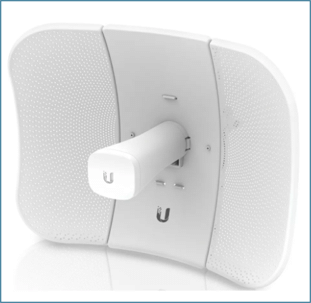
Outdoor directional wireless antenna used to connect the premises to Noble WiFi’s network.
✓ Property of Noble WiFi
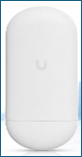
Compact outdoor wireless radio used to deliver connectivity to the property.
✓ Property of Noble WiFi
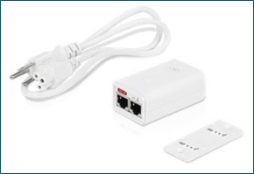
Supplies power to the compatible outdoor wireless device.
✓ Property of Noble WiFi
Need a Router or Surge Protector?
Browse our WhatsApp catalogue for available equipment.
Billing & Payments FAQs
Answers about prepaid billing, invoices, grace periods and ways to pay.
Grace period allows you to use the service for 5 days in the event you are unable to make payment on your account.
Grace period can only be activated AFTER your months service has expired
Using your GRACE PERIOD does not change your Due Date as it is still part of your 30-day prepaid plan.
Log into your NOBLE account and click on the ACTIVATE GRACE PERIOD LINK.
Sign in to the customer portal, locate the relevant invoice and select View to access or print it.
Unfortunately no as the service we offer is prepaid.
NOBLE offers a prepaid service. Your bill is generally due on the same date as your installation is done. However, if your account goes dormant, your bill will become due on the date you reactivate your service.
Pay online through Prime Trust Financial, or browse payment locations. For help with a payment handled by the provider, visit payment support.